Creative Fabrica Studio Desktop is a free Windows and Mac application that brings AI-powered creative tools into one workspace. It includes a local background remover alongside image, video, audio, and other utilities. For Etsy sellers, Cricut users, and print-on-demand creators, it offers a way to prepare designs while reducing reliance on separate online tools.
Selling on Etsy, running a print on demand shop, or cutting files for Cricut all share the same unglamorous step. Before a product photo or a design is ready, it needs cleaning up. Backgrounds have to go, transparent PNGs have to be made, low resolution files need a boost, and then there are listing images, mockups, and short promo videos to produce. Most tools that handle all this are scattered across different websites, each with its own subscription or credit system. Run a full batch through that in one afternoon and it gets slow and expensive.
Creative Fabrica Studio Desktop takes a different route. It brings a full set of free desktop AI tools for creators into a single app on Windows and Mac, and some of those tools, including the background remover, run as local models on your own machine. That mix of a broad toolkit plus real local processing is what makes it worth a proper look.
What is Creative Fabrica Studio Desktop?
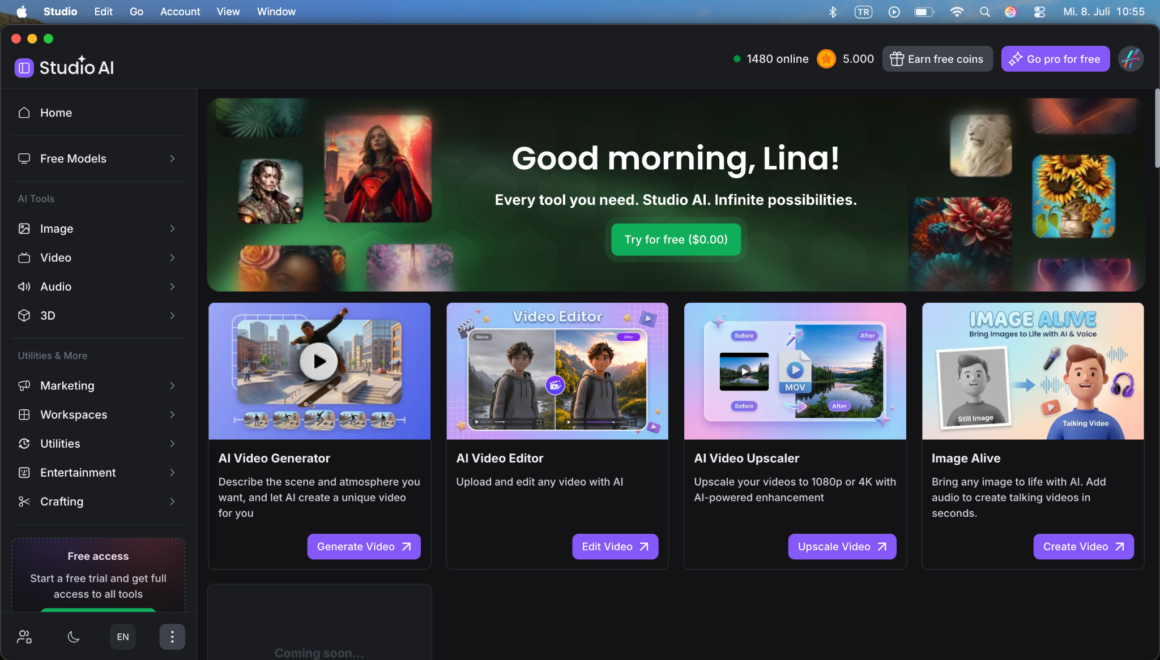
It is a free desktop app for Windows and Mac that puts the Creative Fabrica Studio experience in one window instead of a browser tab. You install it like any normal app, sign in with a free account, and everything is grouped into clear categories down the side: Image, Video, Audio, 3D, plus Marketing and other utilities. New accounts also start with a free coin balance to try the cloud based tools, while the supported local tools do not spend those coins at all.
The local background remover is the highlight
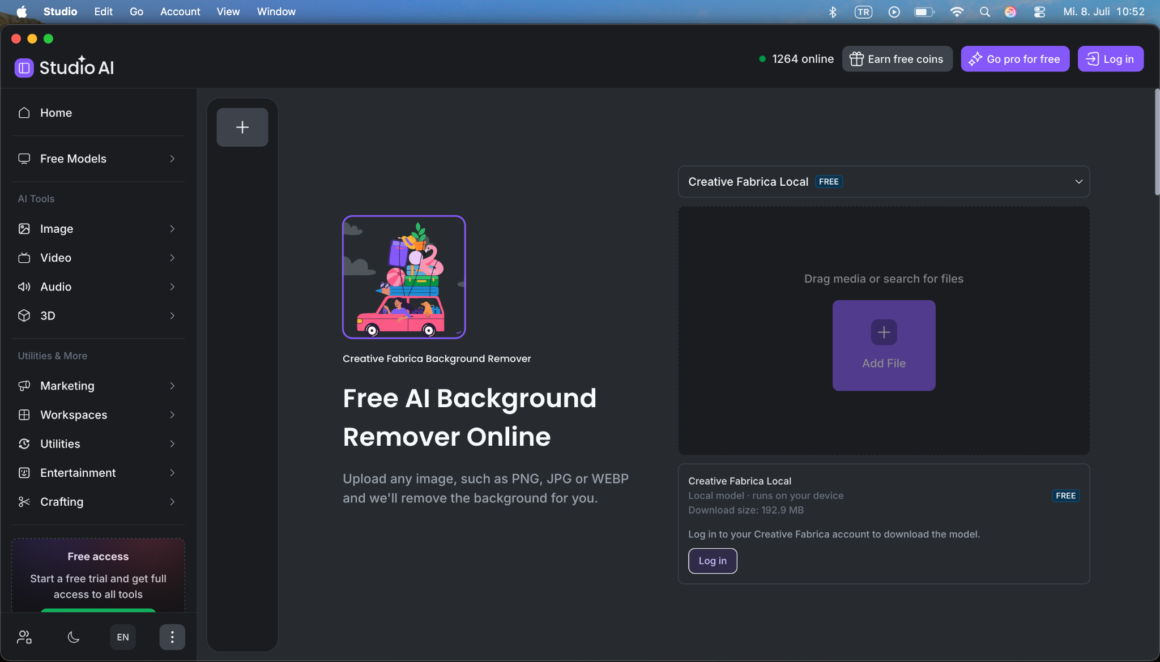
Plenty of apps offer AI features. What sets this one apart is that the background remover runs locally. Open it and it says plainly “Creative Fabrica Local, runs on your device,” along with the model download size, which is around 193 MB. After that one time download, the background removal happens on your own computer rather than on a server.
That matters more than it sounds. Images are not uploaded to the cloud for the local background remover, which is a real privacy benefit for unpublished product shots and client work. Processing is fast because there is no upload and download step for every file. There is no per image credit meter for the supported local tools, so batch work does not drain a balance. And it keeps working even on a slow connection.
The practical use is simple. A product photo comes in with a busy background and needs to become a clean transparent PNG. You drop the image into the background remover, let the local model do the work, and export a transparent PNG that goes straight into a listing mockup or a cutting project. The screenshot below shows the background remover with the local model badge so you can see exactly what to look for.
The background remover is only the start. Here is what else is inside and a real situation where each one earns its keep.
AI Image Generator (GPT Image 2 and NanoBanana 2). Newer models are built in for creating original artwork from a text prompt. Real use: a shop owner needs a seasonal banner or a set of matching Pinterest pins but does not want to pay for stock photos. A short prompt produces unique images that are safe to publish and on brand.
The rest of the toolkit, and where it actually helps
AI Image Editor. Upload and adjust any image. Real use: a product photo has a distracting object in the corner or the lighting is flat. A quick edit fixes it before the photo goes live, without opening heavier software.
AI Image Upscaler. Real use: a customer sends a small, low resolution logo to print on a mug or a sublimation blank. Upscaling it first means the print comes out crisp instead of pixelated. The same trick rescues older designs that were only ever saved small.
Image Vectorizer and AI SVG Generator. Real use: a Cricut or sublimation crafter has a raster PNG or a hand drawn sketch that needs to become a clean, scalable cut file. Converting it to SVG means it can be resized to any size without losing quality.
AI Mockup Generator. Real use: instead of ordering a physical sample, a POD seller drops a design onto a t-shirt, tote, or mug mockup and gets a listing image in seconds.
AI Logo Creator and People Remover. Real use: a brand new shop spins up a first logo to launch with, and a lifestyle photo gets a stray bystander removed so only the product is in frame.
Video tools (Generator, Editor, Upscaler, and Image Alive). Real use: short vertical clips sell well on TikTok, Reels, and Etsy listing videos. The video generator and editor build a quick promo, the upscaler cleans up older footage, and Image Alive turns a single product photo into a short animated or talking clip. There is even a Marketing area with Studio Ad Campaigns that builds a product ad video straight from your photos.
Audio tools (Voiceovers, Text to Speech, Soundtracks, Sound Effects, and Podcasting). Real use: a tutorial or product reel needs narration and background music. A text to speech voiceover plus a generated soundtrack finishes the video without hiring anyone, and the subtitle generator adds captions so it still works when the sound is off.
Having all of this in one app means a single product photo can go from raw shot to background removed PNG, to a mockup, to a short captioned promo video, without ever leaving the window.
Who is it best for
The app fits a clear group of people. Etsy and print on demand sellers cleaning up product photos and building listings. Cricut and sublimation crafters who constantly need transparent PNGs and cut files. Digital product sellers and KDP creators. Designers, small business owners, and content creators who want image, video, and audio tools in one place without a monthly bill. If product images and design assets are part of your week, it earns its spot on the machine.
Pros and limitations
A fair look at both sides.
What stands out:
- A genuinely free background remover that runs locally once the model is installed.
- Windows and Mac support.
- A wide toolkit covering image, video, audio, and marketing in one app.
- Clean transparent PNG output suitable for listings and craft files.
- A free coin balance for trying the cloud based tools.
What to keep in mind:
- Local performance depends on your computer, so older machines will feel slower.
- The local model downloads once before first use.
- A free account is needed to download that model.
- Not every tool is local. Many image, video, and audio tools are cloud based and use the coin balance, so “local” applies to supported tools like the background remover, not to every single feature.
FAQ
Is Creative Fabrica Studio Desktop free? Yes. There is no charge and no card required to install it and use the free tools.
Does the background remover run locally? Yes. Once the local model is downloaded, it runs on your own device.
Does it work on Windows and Mac? Both platforms are supported.
What other tools does it include? Image editing, generation, upscaling, vectorizing, SVG and mockup creation, a logo creator, and a people remover, plus video tools, audio tools, and a marketing section.
Can I use it for Etsy product photos? Yes. It produces clean transparent PNGs, and the mockup and upscaling tools help build stronger listings.
Can I make transparent PNG files for Cricut? Yes. The removed background leaves a transparent PNG, and the vectorizer can turn designs into scalable cut files.
Can I make videos and voiceovers too? Yes. The video and audio tools cover short promo clips, voiceovers, background music, and captions.
Do I need an internet connection? You need it to download the app and the models. After that, the supported local tools like the background remover run on your machine.
Are my images uploaded? For the local background remover, processing happens on your device rather than being uploaded, which is one of its biggest advantages.
For creators who spend real time removing backgrounds, prepping images, and building listings and promos, this is an easy one to try. The free local AI background remover and the rest of the toolkit are available straight from the Creative Fabrica Studio Desktop page.